• Home
  • About us
    • Board of Commissioners
    • Directors
    • Contact us
    • Data protection
    • Making a complaint
    • Our teams
      • Enforcement
      • Policy and Risk
      • Registry
      • Supervision
      • Intelligence
    • Strategic Roadmap
  • Careers
  • Industry
    • Codes of Practice
      • Alternative Investment Funds Code of Practice
      • Certified Funds Code of Practice
        • Certified Funds Code of Practice Schedule 1
        • Certified Funds Code of Practice Schedule 2
        • Certified Funds Code of Practice Schedule 3
        • Certified Funds Code of Practice Schedule 4
        • Certified Funds Code of Practice Schedule 5
      • Fund Services Business Code of Practice
      • General Insurance Mediation Business Code of Practice
      • Insurance Business Code of Practice
      • Investment Business Code of Practice
      • Money Service Business Code of Practice
      • Trust Company Business Code of Practice
    • Consultations
      • Fee consultation No 3 2024 - Feedback Paper
      • 2024 consultations
      • 2023 consultations
      • 2022 consultations
      • 2021 consultations
      • 2020 consultations
      • 2019 consultations
      • 2018 consultations
      • 2017 consultations
      • 2016 consultations
    • Examinations
    • Fees
    • Financial crime
    • Innovation Hub
      • About
      • Help
      • Collaboration
      • Regtech
      • Fintech
      • Suptech
      • Virtual Asset Service Providers
      • Local partnerships and associations
      • Innovation reports
    • Forms
    • Guidance and policy
    • International-co-operation
      • International assessments
      • Memoranda of Understanding
      • Sanctions
    • Legislation
    • Regulated entities
    • Risk
      • National Risk Assessments
    • Sectors
      • Auditors
      • Banking
      • Funds
        • Fund statistics FAQs
      • General Insurance Mediation Business
      • Insurance
      • Investment Business
      • Financial Crime - Schedule 2 Business
      • Trust Company Business
      • Non- profit organisations
        • Non-profit organisations legislation
        • NPO risk assessment
        • Non-profit-organisations-risk-assessment
      • Financial Institutions
      • Money Service Business
    • Schedule 2 Business FAQs
    • Sustainable finance
  • News and events
    • Events and webinars
    • Industry updates
    • News
    • Public statements and warnings
    • RSS feeds
    • Subscribe
  • Protecting the public
    • Fraud prevention
    • Investment mis-selling
    • World Investor Week
    • Retail business accepting large sums of cash
  • Publications
    • Annual reports
    • Business plans
    • Presentations
    • Service reports
    • Engagement reports
  • Registry
    • Annual confirmation
    • Beneficial ownership information
    • Register or make a change
    • Registry fees
    • Registry forms
    • Registry legislation
    • Registry notices
      • Public notices
    • 2025 Registry fees
    • 2024 Registry fees
  • Whistleblowing
  • Login
Jersey Financial Services Commission Jersey Financial Services Commission
  • About us
  • Industry
  • Registry
  • Protecting the public
  • News and events
  • Login

Popular searches

  • Industry Survey
  • Annual confirmation statement
  • Business Plan
  • Compliance monitoring
  • Guidance notes
  • myProfile
  • myRegistry
  • Outsourcing
  • Sanctions
  • Sound business policy
  • Consumer credit

You are here

  • Home
  • Industry
  • myProfile
  • Multi-factor authentication for myRegistry and myJFSC
Contents

Multi-factor authentication for myRegistry and myJFSC

To register/login to your customer account, you will need to use multi-factor authentication. This is required to protect your data.

As an existing user of my myJFSC or myRegistry you must login as normal with your usual login credentials.

If you are a new user you must follow the registration button on the home screen. Once you have verified your email address and set up your password follow the steps below.

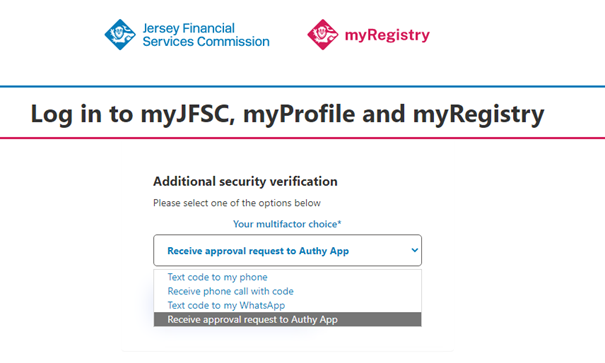
When you reach the multi-factor authentication screen you will now have the option to choose from one of four authentication method:

  • Text code to my phone
  • Receive phone call with code
  • Text code to my WhatsApp
  • Receive approval request to Authy App

Authenticator app

If you have selected to use an app you will need to download an authentication app to your device. You can download this from the App Store or Google Play store. We would recommend using Twilio Authy, Google Authenticator or Microsoft Authenticator.

Once you have signed up to you Authentication app, you must scan the QR code presented on the login portal screen (see below).

You must then click continue on the portal and enter the code provided on your authenticator app. click continue to be taken to the Welcome page.

Text code to my WhatsApp

If you have selected to receive a text code to your WhatsApp, click Continue and enter your mobile number. You will receive a six-digit code to your WhatsApp from Verify
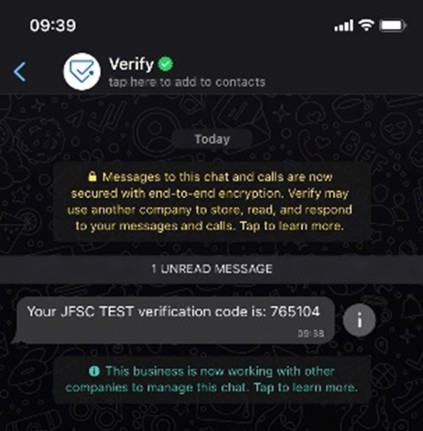
Enter the six-digit code and click Continue, you will be taken to the Welcome page

SMS code to my phone

If you have selected to receive an SMS text code to your mobile phone, click Continue and enter your mobile number. You will receive a six-digit code
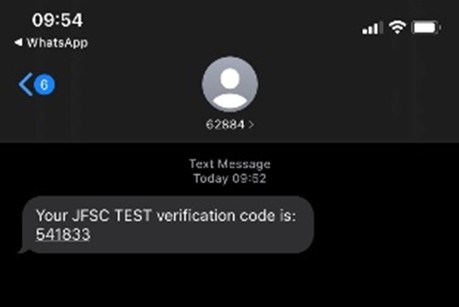
Enter the six-digit code and click Continue, you will be taken to the Welcome page

Phone call with voice code

If you have selected to receive a phone call with the code you will receive a phone call asking you to press 6 on the keypad to receive your six digit code. The code will then be repeated 3 times. Enter the code, click continue and you will be taken to the welcome page.


  • Accessibility
  • Contact us
  • Directors
  • Privacy policy
  • Subscribe
  • Whistleblowing
  • Facebook
  • LinkedIn
Back to top
© 2026 Jersey Financial Services Commission

This website uses cookies to analyse our traffic. To find out more read our cookie policy.